

環境
| 項目 | 値 |
| フレームワーク | Angular |
| デプロイ先 | Azure Static Web App |
問題(発生したエラー)
Deploy時のGitHub Action内でエラーが発生しました。
Error: Could not find either ‘build’ or ‘build:azure’ node under ‘scripts’ in package.json. Could not find value for custom run build command using the environment variable key ‘RUN_BUILD_COMMAND’.Could not find tools for building monorepos, no ‘lerna.json’ or ‘lage.config.js’ files found.
package.jsonの’scripts’内に’build’や`build:azure`の項目が見つからないとのこと。
package.jsonは、npmのpackageの依存を設定したファイルらしいです。(Workspace and project file structure 2026/10/24 閲覧)
公式?に、各Keyの内容が詳しく載っていました。
“scripts”プロパティは、ライフサイクル内の様々なタイミングで呼び出されるコマンドを定義している。Keyは、Lifecycleのevent、Valueはその際に呼び出されるCommandを示します。
npm Docs, package.json, scripts 2026/10/24参照 拙訳
ということで、errorの内容は、Build時に呼び出されるコマンドが設定されていませんよー!ということでした。
解決策
ということで、Project内のpackage.jsonを見たところ、、、ちゃんと定義されている。。。
 "scripts": {
    "ng": "ng",
    "start": "ng serve --host=127.0.0.1",
    "build": "ng build",
    "watch": "ng build --watch --configuration development",
    "test": "ng test"
  },
さらに、調査を進めたところ、GitHub Actionで行うWorkflowの設定に問題があったようでした。
jobs:
  build_and_deploy_job:
   ・・・
      - name: Build And Deploy
        id: builddeploy
        uses: Azure/static-web-apps-deploy@v1
        with:
          action: "upload"
          app_location: "!!!!WRONG VALUE!!!!" # App source code path
          api_location: "" # Api source code path - optional
          ###### End of Repository/Build Configurations
デプロイするプロジェクトのpathに誤った値を設定しており、package.jsonが適切に読まれていませんでした。Static Web Appを作成する際、直接GitHubのRepositoryを指定しており、Repository内にはAngularのproject以外にも、WebAPI用のProjectがありました。ここでは誤ってRepository名を設定しており、これによって、package.jsonが適切に読み取られていませんでした。
Azure Static Web Appを作成する際、Microsoft公式の資料を参照していたのですが、自分のアプリに合わせて設定しなければいけないところを誤っていたようです。
以下、参照したMicrosoftのサイトです。1つ目は、AngularのプロジェクトをAzure Static Web AppにDeployする方法。2つ目は、Buildの設定ファイルの各項目の解説です。(YAMLファイル)
- Microsoft, Deploy an Angular app on Azure Static Web Apps
- Microsoft, Build configuration for Azure Static Web Apps
Static Web AppにDeployする流れ(そもそも)
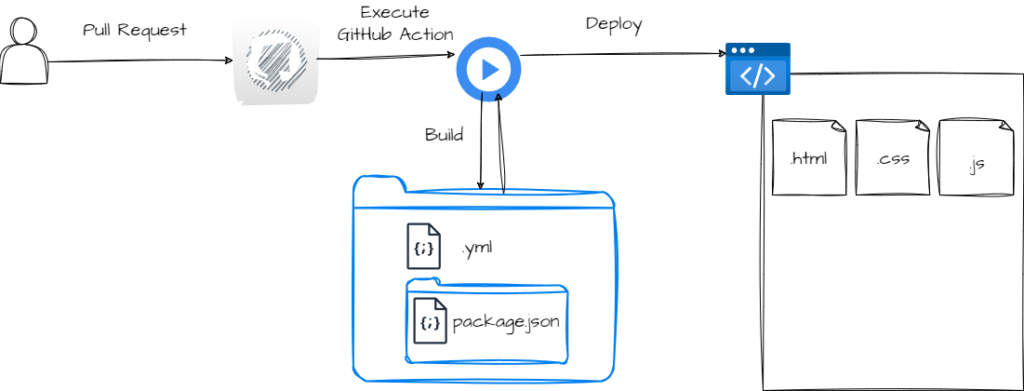
GitHub ActionでDeployまでもっていく流れ(CI/CD)をちゃんとわかっていなかったのですが、おそらくこんな感じでDeployまで持っていっています。今回は、この流れがわかっていない中で、ymlファイル内の設定に不備があったため、てこづってしまっていました。
まとめ
- AngularのプロジェクトをAzure Static Web AppにDeployする際にエラーが発生した。
- あらかじめworkflowを設定することで、Azure portalやGitHub Actionで呼び出し、Deployする。
- workflowやBuildの設定は、ymlファイルやプロジェクト内のpackage.jsonに記載されている。


コメント